Why Didnt Some Of My Apps Download On My New Phone UPDATED
Why Didnt Some Of My Apps Download On My New Phone
Updated
How to transfer everything from your old Android telephone to your new one
No one wants to spend forever moving all their stuff to a new phone. Here's a quick and painless guide to get you up and running fast.
Getting your data from an old Android telephone to a new 1 isn't hard, simply yous'll want to follow these steps.
Summit Deals On Nifty Products
Picked by Techconnect's Editors
- Google Bulldoze
- Other backups
- Mail and Calendar
- Photos and music
- Passwords and bookmarks
- SMS and MMS messages
Show More
Getting a new telephone is awesome, simply transferring all of your data over from your old one isn't. Luckily, information technology'south gotten a lot amend than it used to exist, and information technology doesn't take too much work anymore. With a Google business relationship and a piffling patience, you don't need to be an Android whiz to ensure your stuff can hands transfer to a new phone.
Google Bulldoze
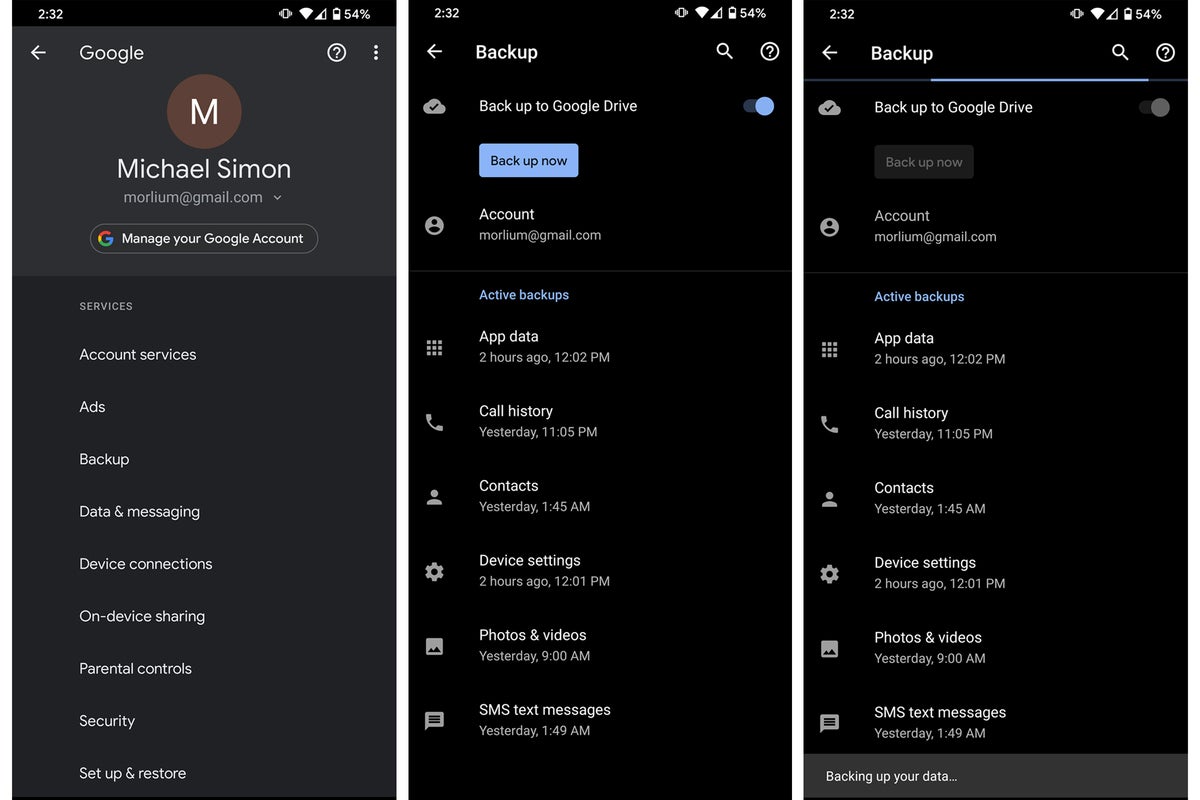
Before yous tin do annihilation, you'll need to make certain your old phone is signed in to your Google account. It near certainly is, just head over to the Google tab in Settings to make certain. Then, you'll need to find your telephone's fill-in settings. On Pixel phones running Android 10, there'southward a Backup choice inside the System tab in Settings, but the location varies on other phones. The easiest fashion to detect it is to type "backup" into the settings search bar.
 IDG
Your Google business relationship comes with a great congenital-in fill-in inside Google Bulldoze.
Once you're at that place, you'll run across a couple options. On Pixel phones, there'south a Back up to Google Drive switch that will enable several types of content to be backed up, including installed apps and accompanying data, call history, device settings, calendar entries, contacts, photos and videos, and, sectional to Pixel phones, SMS letters. It'll be backed up automatically overnight, so once yous switch it on, you lot won't accept to give information technology some other thought.
On other phones, you'll probable find the toggle inside the Google tab, but the options will be the same: App data, Call history, Contacts, Device settings, Photos and Videos, and SMS text messages. You have the option to select one or all of them whenever y'all dorsum upwards.
Since backups work through Google Drive, if you head over to the app, you'll see a Backups pick in the sidebar. Inside you'll run across a list of any devices that have been backed up, with your current phone occupying the pinnacle slot (perhaps with a funky proper noun like SM-G96OU1 or Hard disk 1905). Tap it and yous'll be able to meet when the concluding backup took identify and which apps were included.
Other backups
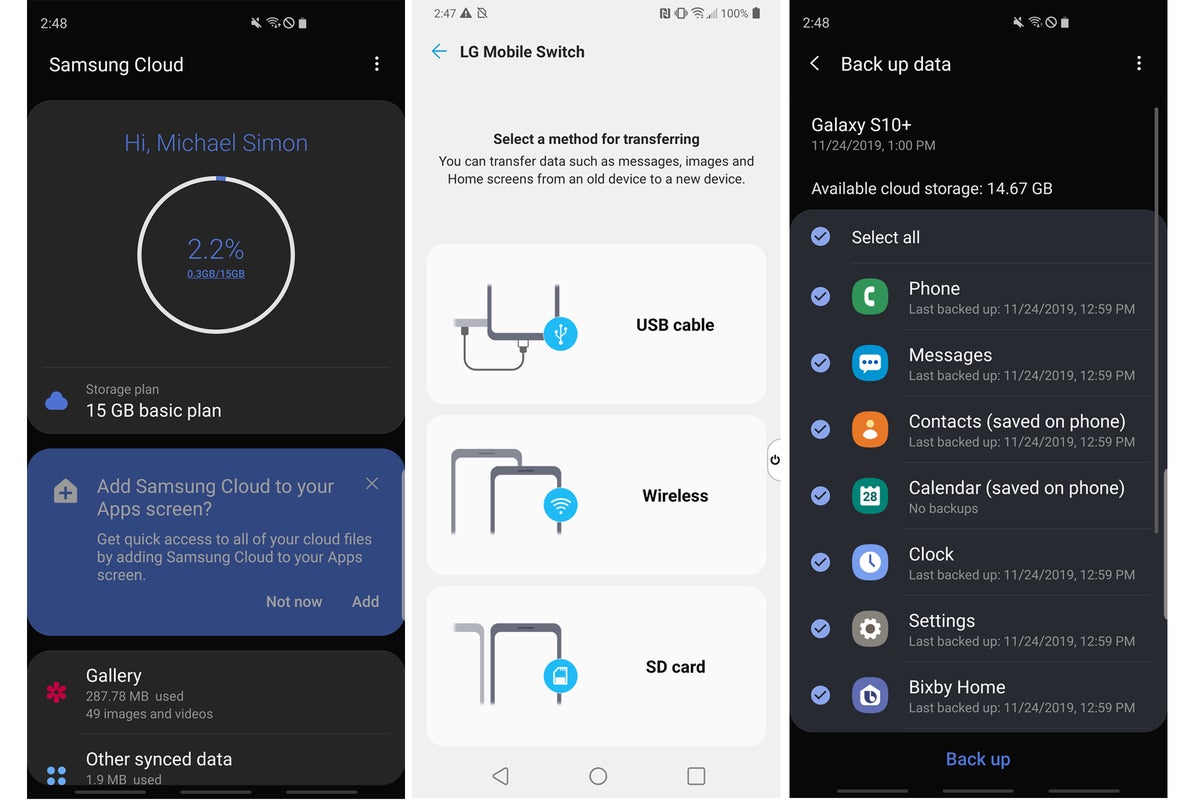
Nigh Android phone makers offer their ain helping hands when it comes to moving over your stuff. Granted, they'll work best when transferring to a phone of the same make (similar a Galaxy S8 to a Galaxy S10), merely they all by and large practise a fine job. You can find it by typing backup into the search field in Settings.
 IDG
Samsung, LG, and other phone makers offer their own backups and transfers inside the Settings app.
Samsung offers its own service called Smart Switch that's built right into Settings. Turn it on and sign into your Samsung account, and it will sync the same things Google does, plus your notes, alarms, messages, and even your abode screen layout to your new telephone. The grab is that you need to use Samsung's apps to get the most out of information technology.
Bated from proprietary backups, most phones will also allow you to transfer apps and settings. Y'all'll be prompted during setup, and most volition require a cable, but it's a good fallback if you don't remember to regularly dorsum up. For instance, LG as well offers an app called Mobile Switch that lets you wirelessly transfer your photos, video, music, text messages, and apps from ane LG telephone to another. Other phones permit you transfer data from a competitors' phone—even iPhones—merely the results are somewhat spotty, so we still recommend turning on Google Drive backups.
Mail and Agenda
Even if y'all have Google Drive backups turned on, y'all'll still demand to cheque a few more settings to make sure your most important things brand it over when you power on your new phone.
Postal service, of class, is the easiest of all. If you apply Gmail, you need only sign in to your Google account to bring over all of your letters, labels, etc. And your other accounts, whether Outlook, iCloud, or Hotmail, volition be only equally easy. Merely download your favorite app, type in your username and password, and you lot'll exist on your way. Additionally, there are numerous apps such as Newton and Blue Mail that will go along multiple accounts synced with a single login.
For people and appointments, Google has you covered here, too. Even without a proper Google Drive fill-in, any entries inputted into Agenda on your phone will automatically appear on your new telephone as soon as y'all open up the app. Some calendar apps besides sync with Google Calendar, and then you'll want to brand sure it'southward set upward fifty-fifty if it's non your scheduling app of option.
Photos and music
Photos are rapidly becoming the ane thing that admittedly needs to exist transferred from 1 telephone to the next, and Google has built a fantastic mode to exercise it in its Photos app.
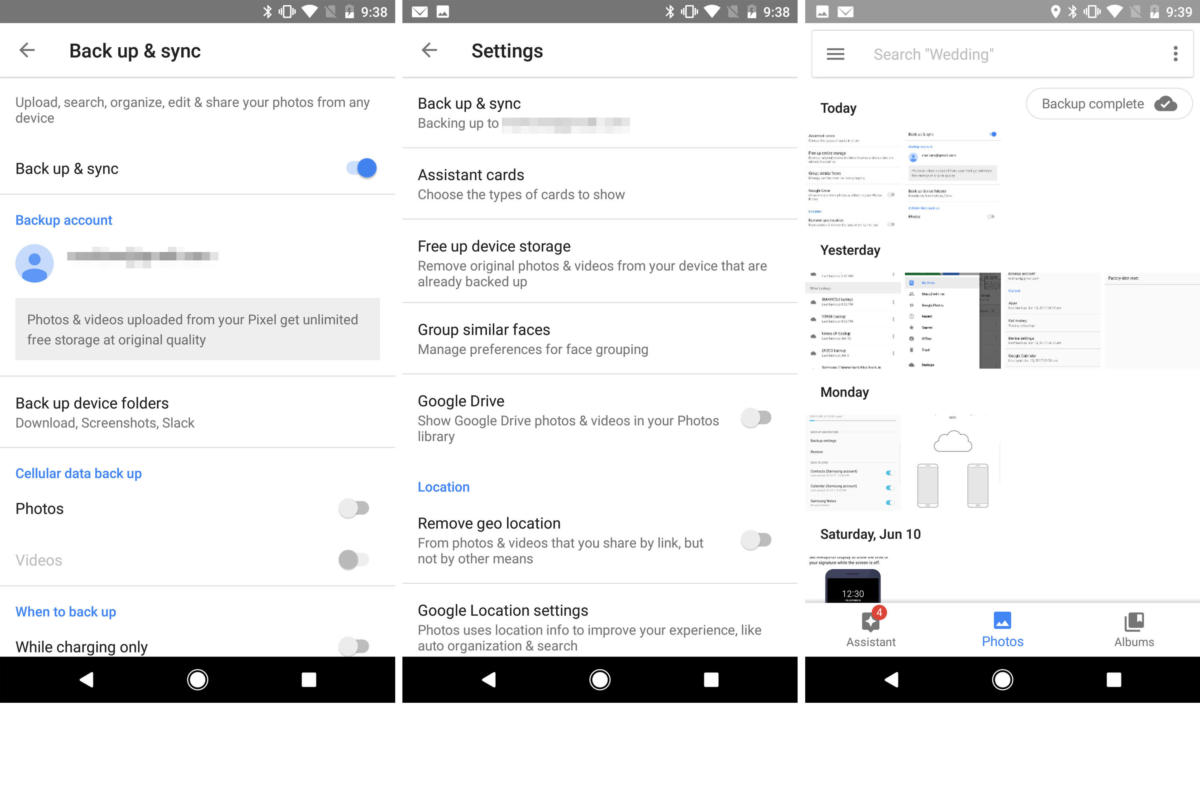
Available for all phones, it'due south far and away the best photo management option, backups aside, so if you're not regularly using it, you should be. To brand sure it's backing up everything, head over to the Settings in the sidebar and tapBack up & sync. Make certain the toggle is blue and the backup account is the same as the i y'all utilise for everything else.
 IDG
You lot can back up all of your photos in high quality without using a unmarried megabyte of space in your Google Drive.
Google lets y'all back up as many loftier-quality photos as you'd similar, and it won't count confronting your Google Drive storage. If that's not enough resolution for you, y'all can opt to back up the full-sized original photos to your Google Drive, just it'll cost y'all. While Google gave original Pixel users unlimited backups of their original photos and Pixel 2 and iii users iii years' worth, anyone else (including Pixel 3a and 4 owners) will have to use their allotted Google Drive space, so you might accept to bump up your storage to arrange the extra gigabytes. Google Drive users simply get 15GB free, so if your photographic camera ringlet is bigger than that, yous tin can pay $1.99 a month for 100GB or $9.99 a month for 1TB of storage. But whichever size yous choose, all of your photos will appear when yous open the Google Photos app on your new phone.
When it comes to music, at that place are ii ways to do it. If you already subscribe to a streaming service like Spotify, YouTube Music, or Apple Music, but head over to the app in your new phone and sign in to access all of your songs. This is your best bet, as the loss of the Google Play Music app has made information technology harder to play local tracks on your phone.
 IDG
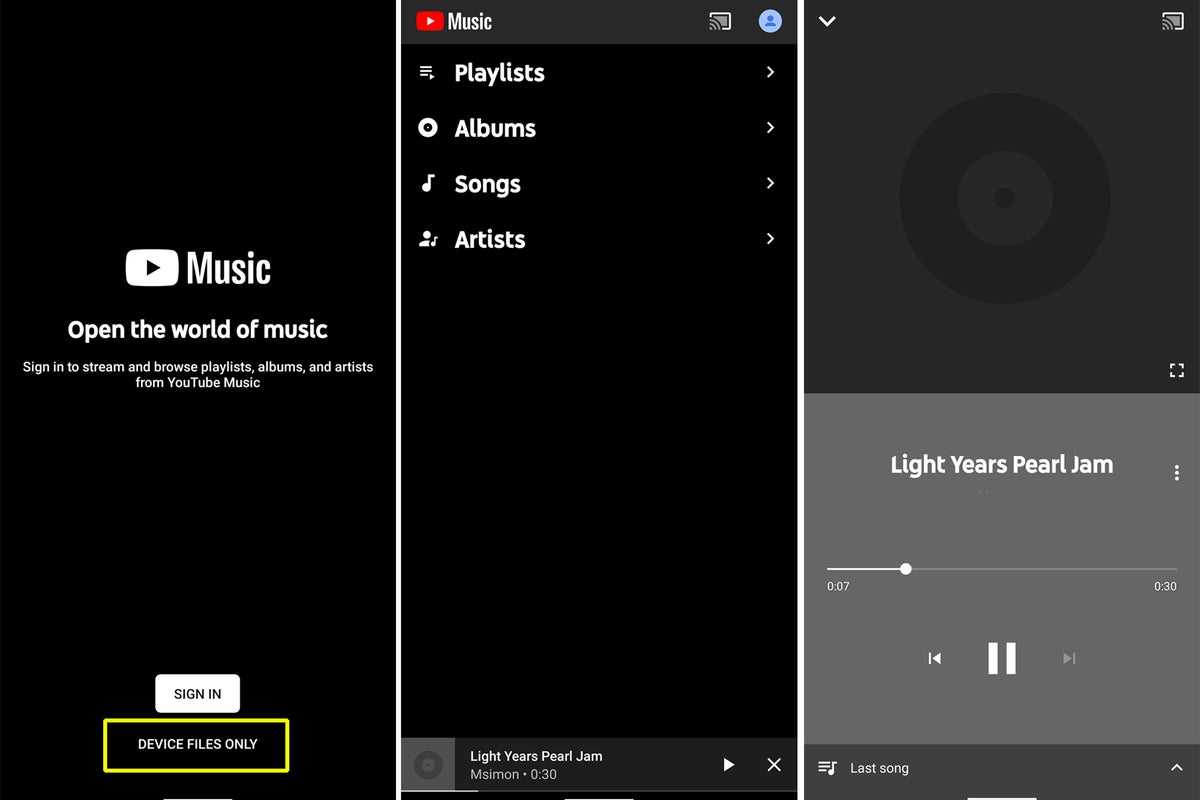
Information technology's rudimentary, but if you want to play songs that are stored on your device, YouTube volition let you.
If yous aren't a streamer, YouTube Music will even so assistance you get your groove on, letting yous admission files stored on your device without needing to subscribe to the service. It's very rudimentary and a piffling frustrating, but with a little patience, y'all'll be able to go it to piece of work. To see your tracks, simply store them in a microSD card or your Google Drive, and so transfer them to your new phone's files app. YouTube Music volition find them and display them nether the Device Files tab, and yous'll be able to play them as you like, but you lot won't be able to add them to YouTube Music playlists or bandage to another device.
Passwords and bookmarks
If you apply Chrome on your phone, you can too accept your browser history, passwords, and bookmarks to your new telephone. First, caput over to the Google tab in Settings, and coil down to the Smart Lock for Passwords option.
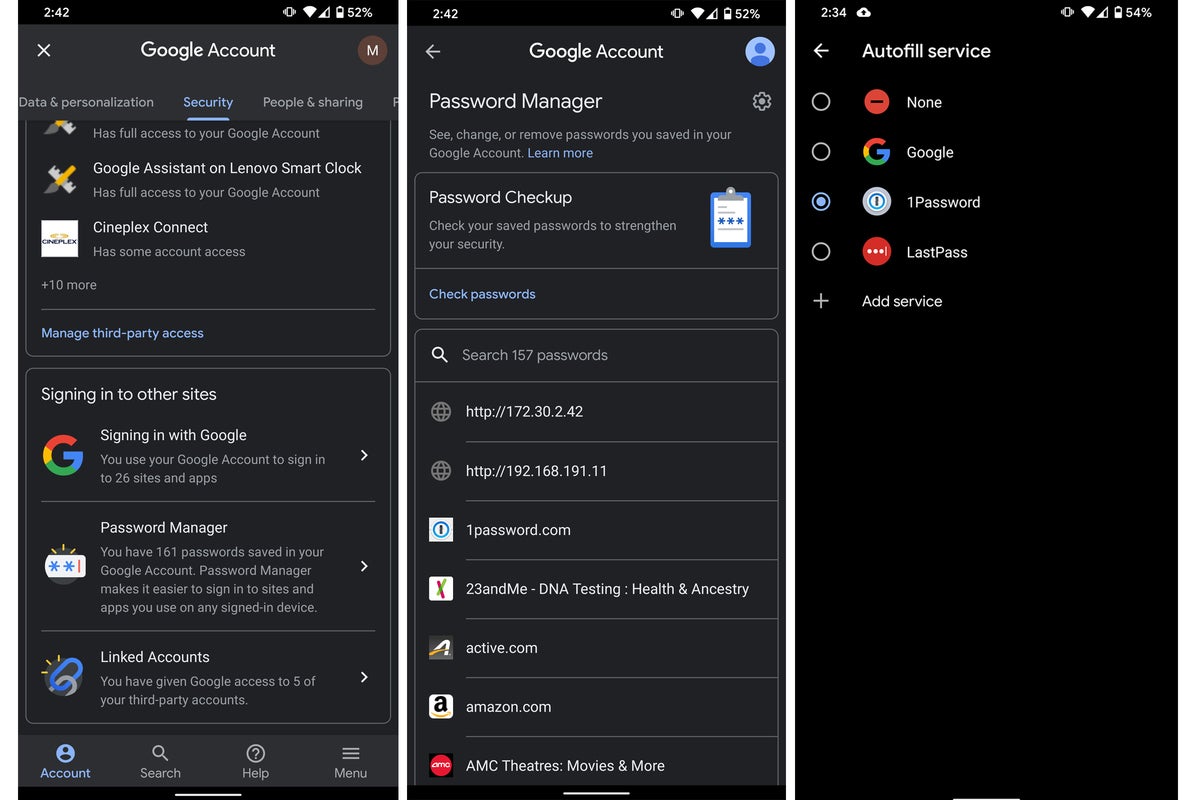
This setting stores passwords from supporting apps and Chrome sites to your Google account. Switch it on, and the next fourth dimension y'all sign in to Chrome on your new phone you won't take to re-enter the same passwords over and over. It works with some third-political party apps, too, as long as the developers take built in support. Just caput over to the Security tab in your Google Business relationship to see which ones are stored.
 IDG
Your Google account stores passwords, merely yous'll desire to utilize a password manager for the all-time security.
If you're leery nigh app passwords being saved in your Google account, you can blacklist any app from using Smart Lock. Or you can forgo it all together and download a password manager. In that location are plenty of cracking ones out there including Dashlane, LastPass, and 1Password, and they'll all store your passwords in an encrypted locker. Nigh accuse a fee, but information technology's worth it. Yous merely need to sign in on your new phone, and you'll have admission to all of your passwords through Android autofill feature. (See PCWorld'south roundup of the best password managers for more details.)
For the residual of your web needs, head over to the Chrome settings. Tap on your account name and and so sync to come across everything that yous want to shop in the cloud, including bookmarks, history, open up tabs, and saved credit cards. Once you select the ones you want, they volition all be available when you lot sign in to Chrome on your new device.
SMS and MMS messages
Moving your conversations over is a petty trickier than the residual, but it'south getting improve. The easiest fashion is if y'all use WhatsApp, Telegram, Facebook Messenger, or some other 3rd-party service, since yous simply need to sign in to the appropriate app to admission your full chat history. Also, If you own a Pixel phone and/or apply Android Messages, at that place is an option inside your Google Drive backup for backing upwards your SMS messages, though it volition leave backside any photos or videos.
 IDG
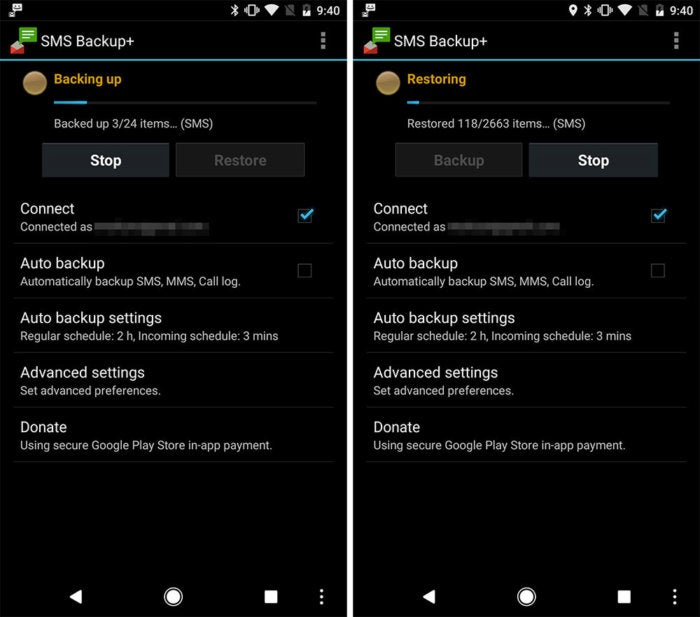
If y'all want to bring over all of your SMS and MMS messages, you'll need to download a backup tool.
And so until Google starts backing up MMS messages, the most fool-proof fashion to move all of them from Android Messages or your text-messaging app of pick to a new phone is an over-the-top service. There are several in the Play Store—SMS Fill-in+ and SMS Backup & Restore are two of the most pop and highest rated—and they human action as a sort of middleman that collects your messages until you're ready to transfer them to a new app.
It's not the speediest procedure, so yous'll need to carve out some time to permit it run if y'all have a lot of letters, simply it works quite well. In our testing, we used SMS Backup+ to support and restore a batch of more than two,000 messages on a test device without a problem. Information technology'due south baffling why Google hasn't implemented a similar system in Android, but for at present, apps like SMS Backup+ will certainly do the play tricks.
One word of caution, still: Don't wipe your old phone until you're certain your messages take appeared on your new one. This way you lot'll exist able to start over if something goes amiss during the transfer.
And that'south it. With the right combination of apps and deject services y'all don't have to worry about leaving anything behind anymore when you become a new phone. No affair if you want your letters, music, or mail, your Google account is the No. 1 tool in your armory, and information technology's rapidly becoming a one-stop shop for bankroll upwards and transferring everything from one telephone to another.
Note: When you purchase something after clicking links in our manufactures, we may earn a small commission. Read our affiliate link policy for more than details.
DOWNLOAD HERE
Posted by: scuddersubt1967.blogspot.com

Post a Comment for "Why Didnt Some Of My Apps Download On My New Phone UPDATED"