Best Video Editor Software Download Statistics
In a world dominated past visual content, a captivating video can help drive your make'due south success. Merely creating stunning video content is only possible with the help of an editing software. Most renowned video editing tools carry a high price tag, only at that place are some as good options that don't price a penny. That'south great news for the starry-eyed entrepreneur. Whether its Instagram stories, Facebook ads or YouTube product testimonials, using the best free video editing software will make your make look slick and professional.
With the corporeality and quality of video editing software available, you don't have to exist Spielberg – or have his budget – to get ballsy results.
For this commodity, we compiled the all-time complimentary video editing software for 2022. Our list focuses on the most versatile editing software for videos which nosotros could detect. While each user has different needs, this guide will provide you with a proficient overview of what you can expect from each movie editor and how to become the all-time out of it.
Nosotros've divided our choice into the best gratuitous video editing software for PC, mobile video editing apps, and video editors for Instagram. Set up to become started?
Lights, camera, activity!
Got a store but need cool products to sell (and pic)? Try Handshake, a wholesale marketplace past Shopify.
Best Gratuitous Video Editing Software for Desktop
The following list of costless video editing software for PC contains desktop apps. Desktop applications typically have more than editing power than mobile apps. Use these video editors when you demand to produce longer-form content for YouTube or your website.
All of these video editors are either entirely complimentary to utilise or accept an fantabulous complimentary version. And their use ranges from bones to advanced.
1. Blender
Bachelor on Windows, Mac, and Linux.

Blender, one of the best costless video editing software on the market, is available for Windows, Mac, and Linux.
Blender is an open source programme that is entirely complimentary to use. The tool was really designed as a 3D animation suite, merely it does come with a very good video editor app. Blender's video editor should be enough for most of your video needs.
The editor allows you to perform bones actions like video cuts and splicing. Yous tin can also use it to deport out more than complex tasks like video masking. This makes it a very flexible video editor that caters to both beginner and advanced users.
The Blender Video Editor includes the following features:
- Live preview, luma waveform, chroma vectorscope, and histogram displays.
- Sound mixing, syncing, scrubbing, and waveform visualization.
- Upwards to 32 slots for adding video, images, audio, and furnishings.
- Speed control, adjustment layers, transitions, keyframes, filters, and more.
Pros: Perfect for advanced users who are not put off by all the features.
Cons: The sheer array of features make the learning curve a little steeper. Most of the tutorials are focused on the 3D animation/modeling side. The resources to help you with the video editor are very express.
Best for: More advanced projects that may involve 3D animation.
Blender Reviews : Cheque out Blender user reviews
ii. Lightworks
Available on Windows, Mac, and Linux.

Lightworks is another great free video editing software, available on Windows, Mac, and Linux.
Lightworks is one of the more powerful video editors on the listing. It's packed with tons of useful features. The free version should be more than enough for well-nigh users.
- Lightworks' free version includes: High precision video trimming.
- Multicam back up.
- Export to 720p for YouTube.
- A wide range of video formats supported.
While most features are included, 4K video support for YouTube and Vimeo is only included in the paid version of the software, which costs around $25 a month.
Compared to Blender, Lightworks has many not bad video tutorials which can make information technology quicker to get up and running. Check out this feature comparison to make certain the free version has what you demand. If the costless version doesn't run into your requirements, you can consider one of Lightworks' paid video editor programs.
Pros: Very powerful video editor with many advanced features.
Cons: 4K video support only in paid version. Some users may find Lightworks too advanced.
Best for: All-round desktop video editing.
Lightworks Reviews : Check out Lightworks user reviews
3. Shotcut
Available on Windows, Mac, and Linux.

Shotcut is one of the best gratis video editing software for Windows, and information technology likewise works groovy on Mac and Linux PCs .
Shotcut, like Blender, is a fully open source program, and then you get access to all the features without the demand for a paid upgrade.
While this video editing software has swell features and tutorial videos, some users may find the interface a little quirky. That'due south because Shotcut was originally designed for Linux and it definitely shows. But, under the hood, it's yet a quality video editor.
Ii of Shotcut'due south most hit features are 4K HD resolution support and its timeline editing. Non many free video editors offer 4K resolution support. Plus, Shotcut doesn't require you to import your video into the editor: this can be a timesaver if you are dealing with large video files.
What's more, Shotcut also caters to those looking for a 1080p video editor. The app supports 1080p videos at 60 FPS (frames per second). Besides it offers 3 lossless export formats, allowing you to transfer videos with no loss (the only downside is the huge file sizes).
Pros: Native timeline editing and 4K resolution support.
Cons: The quirky interface may be off-putting for some users.
All-time for: 4K, Hard disk drive and 1080 video projects.
Shotcut Reviews : Cheque out Shotcut user reviews
four. DaVinci Resolve
Bachelor on Windows, Mac, and Linux.

DaVinci Resolve is arguably the most avant-garde video editor on the list. While it has many professional person video features, its interfaces remain intuitive. Alongside video slicing and trimming, y'all can master audio and correct color. The app likewise gives you the pick to add 2d and 3D titles to your video.
If yous just want to trim and upload your videos, the rich characteristic fix of DaVinci Resolve may exist besides all-encompassing. Even so, if your video project is a little more than advanced, the gratuitous version of this software is hard to beat out.
DiVinci Resolve'southward features include:
- Advanced trimming
- Multicam editing
- Color correction
- Audio mastering
Pros: Intuitive interfaces and incredible color correction.
Cons: Its wide array of features make it a fiddling overwhelming, and not all tutorials are complimentary.
Best for: More avant-garde projects where yous demand to right colors.
DaVinci Resolve Reviews : Bank check out DaVinci Resolve user reviews
5. Openshot
Available on Windows, Mac, and Linux.
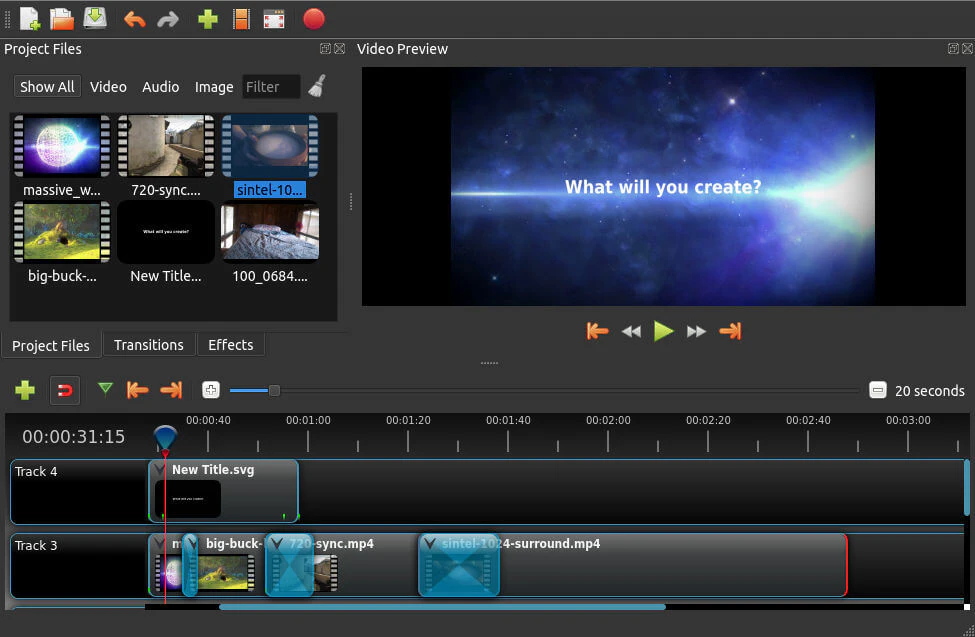
Openshot is entirely open source, which makes it one of the best video editing software that is accessible.
Information technology may remind some Mac users a little of iMovie with its piece of cake to apply drag and drib interface. However, Openshot packs more features than iMovie, including unlimited layers and sound mixing.
This gratis editor strikes a nice balance between avant-garde features and a simple interface. It likewise allows existent-time previews when you lot create transitions between clips.
Openshot's features include:
- Unlimited tracks/layers
- Prune resizing, scaling, trimming, snapping, rotation, and cutting video transitions with real-time previews
- Compositing, image overlays, watermarks
- Title templates, title creation, subtitles 3D animated titles (and effects)
- Advanced Timeline (including drag & drop, scrolling, panning, zooming, and snapping)
Pros: Open source, unlimited layers.
Cons: Non that many video tutorials.
All-time for: Slap-up for users just starting out with video editing.
Openshot Reviews : Check out Openshot user reviews
6. Avidemux
Bachelor on Windows, Mac, and Linux.

Avidemux'due south simple interface makes it ane of the best editing software for beginners looking to make enticing video content.. This plan can help you to perform basic tasks including:
- Uncomplicated cut
- Encoding
- Filtering
If you are completely new to video editing, this might exist a expert place to start.
Pros: Very simple software; no demand to read technical docs.
Cons: Not equally many features as other video editors.
Best for: Basic editing tasks for beginners.
Avidemux Reviews : Check out Avidemux user reviews
7. HitFilm Limited
Available for both Mac and Windows.

HitFilm Limited is one of the best gratis 360 video editing software for Mac and PC users . It contains all the features yous would await from a bones editor (splicing, trimming, and sound editing) plus much more than. While some users may detect HitFilm a little avant-garde, information technology's certainly one of the best all round free video editors out there. The free bundle includes over 180 special effects.
The tutorials are mainly based on well-known Hollywood movies like Star Wars, but these are very interactive and engaging.
Earlier you can download this software, Hitfilm asks you to share a condition update on social media. Still, this is a very small price to pay for such advanced software. Hitfilm'southward features include:
- Advanced cutting tools
- Keying for green screen effects
- Sound and video filters
- Compositing tools
- Layers and masking
- 3D video back up
Pros: Truly professional person video editor without the toll tag.
Cons: May take some time to acquire the interface.
Best for: YouTuber Vlogs – YouTube uploading is built-in.
HitFilm Express Reviews : Check out HitFilm Limited user reviews
8. InVideo
Bachelor on Windows and Mac

This online video editing tool is great for marketers, publishers, individuals and agencies akin. With support for intelligent frames, automated vocalisation overs, and much more, this desktop-compatible software is best in class for many different reasons. Users praise this video editing software for it's astonishing customer service, UX, value for money, and of course it's features.
With new high-quality video templates added well-nigh months, this tool is good for beginner and seasoned video editors alike. It is deceptively simple to use, and has amazing flexibility.
Invideo'south features include:
- Sound Tools
- Brand/Text Overlay
- Collaboration
- Speed Adjustment
- Separate / Merge
- Supports HD Resolution
- Video Stabilization
Pros: Awesome for creating quick presentation videos.
Cons: It is not an all-in-1, 360 video editor. You cannot add more ane audio file, etc.
All-time for: Creating marketing videos or listicles for your blog.
InVideo Reviews : Check out InVideo user reviews
9. iMovie
Available on Mac

Good old iMovie comes baked into Mac OS. Like most native Mac apps, this video editor is very intuitive to use.
iMovie's drag and drib interface makes it quick to motility and edit video elements. Mac users can use this editing software every bit a playground for learning the nuts of video editing. iMovie'due south features include:
- Library of pre-fabricated transitions
- Video trimming
- Sound editing
- Carve up screen
- 4K resolution support
Pros: Easy to learn.
Cons: Advanced users may find features a piffling express; import and render times can be a little ho-hum.
Best for: Mac users getting started with video editing.
iMovie Reviews : Cheque out iMovie user reviews
10. VSDC Free Video Editor
Available on Windows.

One of the best complimentary 360 video editing software only available on Windows is VSDC. The gratuitous version has a powerful prepare of features including colour correction and audio editing. Color blending lets you alter the expect of the video to adapt your brand paradigm. Instagram-like filters are also bachelor to help beginners salve fourth dimension editing. Additionally, VSDC allows you to create varying shaped masks for blurring, hiding, or featuring specific elements in your footage.
If you're looking for paid video editor recommendations, VSDC has a pro version that costs $19.99. Information technology comes with all of the features that are present in the free version plus epitome stabilization, voice over support, and visual waveform. If y'all choose not to update to the pro version, then technical back up costs $ix.99 for i calendar month, or $14.99 for a yr.
Pros: Relatively straightforward to learn with many powerful features.
Cons: Technical support is not free; Windows only.
Best for: Windows-based editing projects
VSDC Reviews : Bank check out VSDC user reviews
11. Machete Video Editor Lite
Bachelor on Windows.

Machete Lite is the best costless video editor for doing quick editing tasks on a Windows computer. In the gratuitous version, you cannot edit audio, but you can remove audio tracks. Also, the free version only supports AVI and WMV files.
Machete Video Editor Lite'southward features include:
- Copy, cutting, paste, and delete video file fragments
- Integrate one video into some other of the same format
- Edit metadata (file tags) for all compatible media formats
- Extract video stream as an individual file
The full version costs $19.95, and it allows y'all to edit audio and supports more file types.
Pros: Super simple to learn and use.
Cons: Windows only; does non support equally many file types every bit other programs; no audio editing.
Best for: Elementary video splicing.
Machete Reviews : Check out Machete user reviews
12. VideoPad
Available on Windows

VideoPad is one of the best video editing tools to take your commencement steps into the globe of multimedia video editing. Information technology'southward perfect for anyone starting to play around with video compositions equally it is uncomplicated and piece of cake to use. Advanced video editors may find it also basic though.
VideoPad's features include:
- Library of pre-fabricated transitions
- Export Movies In Multiple Resolutions
- 3D Video Editing
- Reduce Camera Shakes
- Audio Effects Library
Pros: Robust features for straight exporting to YouTube and other social platforms.
Cons: Likewise simple for more avant-garde users.
Best for: Beginners getting started with video editing.
VideoPad Reviews : Check out VideoPad user reviews
13. Freemake Video Converter
Available on Windows

Freemake is a free video converter that can modify and convert videos, extract audio from video clips, and embed videos to websites. Elementary and fast, Freemake allows you lot to catechumen video clips to be played on diverse mobile devices and gadgets.
The software can catechumen videos between more than 500 video file formats and supports multiple audio and epitome file formats for creating slideshows and video clips.
Freemake's features include:
- Catechumen Videos Fast And Elementary
- Catechumen Movies With Subtitles
- Convert Betwixt 500+ Formats
- Cutting, Join, And Rotate Clips
- 4K resolution support
Pros: No specialist cognition required.
Cons: When you get-go install some features are locked for three days.
Best for: Converting videos into a myriad to file formats.
Freemake Reviews : Cheque out Freemake user reviews
14. EaseUS Video Editor
Available on Windows

EaseUS is a simple and constructive video editing tool, perfect for beginners and professionals alike.
It comes with features that allow you to brand enticing videos to share on digital pages. You tin can trim MP3s, add effects, and even apply pre-fabricated templates to your videos.
The EaseUS video editor can besides be a handy special furnishings editor, assuasive you to quickly add transitions, overlays, and filters to your clips for artistic purposes.
And because the complimentary video editing software supports nigh sound, video, and image formats, you lot should have no problem importing and exporting files.
You'll demand the premium version of the software to remove the video watermark and access the widest selection of high-quality video services.
Features include:
- Access to diverse file formats, including MP3 and MP4
- Conversion files in the wrong format
- Splendid range of trimming, merging, rotating, mixing, and splitting features
- Plenty of special furnishings, filters, and overlays
- Templates to assist yous in building your own videos from scratch
Pros: Ideal for adding special furnishings to your videos with minimal background knowledge.
Cons: Doesn't take as many advanced features as other free video editors.
All-time for: Adding filters and effects to your videos.
EaseUS Reviews: Check out EaseUS user reviews
All-time Free Video Editing Software for Mobile
These apps are for people who like to capture and share videos from their smartphones and edit videos on the go. While there are many keen video editing apps out there, this list covers some of the best, most intuitive, and gratis to use video software for mobile devices.
fifteen. Quik
Bachelor on iOS and Android

Quik is a free video editing app from the makers of GoPro. This app is similar to the pop mobile video editor Splice, but takes a little editing power away from the user. Information technology has auto trim and edit features that practise speed up the editing process, nevertheless, you can all the same manually edit your clips if you lot want more control.
Information technology's impressive what Quik tin do automatically: it searches your video to find peachy moments and tin even add transitions. If you really need a fast edit, this is the app for yous. Also, unlike Splice, it's available to Android users, too!
Pros: Motorcar editing features.
Cons: Some users may desire more editing command.
Best for: Quick, individual video edits.
Quik Reviews : Bank check out Quik user reviews
16. Adobe Premiere Rush
Available on iOS and Android

Adobe Premiere Rush is a very popular Android and iPhone motion picture editor. Add together music (your own or from the library included), transitions, machine-right the colour, and you're ready to share your video.
With its two modes, Freeform and Automatic, yous tin choose whether y'all retain editing control, or you let Adobe option transitions and trim your clip automatically. Adobe users will exist happy to know that this app syncs beautifully with other Adobe staples such as Lightroom.
Pros: Elementary to employ; Adobe Creative Cloud support.
Cons: Lacks a few bones functions like the power to rotate clips.
Best for: Basic mobile video editing.
Adobe Premiere Rush Reviews : Check out Adobe Premiere Blitz user reviews
17. Horizon
Bachelor on iOS and Android.

Horizon is a unproblematic app that enables users to capture videos horizontally no matter the position of their phone.
When we rush to capture a moment we may forget to tilt the telephone and capture the activeness horizontally. This app can assistance you solve that trouble: all footage shot in the app is captured horizontally no matter how you lot tilt your phone. Bank check out this demo to see how it works.
If yous want to avoid vertically captured videos and make something quick, Horizon has y'all covered.
Pros: Very simple to use; never waste vertical content.
Cons: Android version is not equally avant-garde every bit iOS version; some in-app purchases may be necessary depending on your needs.
Best for: Always capturing film horizontally.
Horizon Reviews : Check out Horizon user reviews
18. Promo.com
Bachelor on iOS and Android .

Promo.com is a keen tool to create gorgeous, professional videos, especially for social media posts and advertising. With a web and mobile version of the program, you lot can edit videos at your desk-bound or on-the-become easily.
Features include:
- Audio Tools
- Brand/Text Overlay
- Social Sharing
- Speed Adjustment
- Split / Merge
- HD Resolution
- Video Capture
Pros: Super piece of cake to use, very intuitive UX, and great automation.
Cons: It can be difficult to position text and images in the mobile version due to the screen size.
Best for: Quick and simple mode to create high-quality ads.
Promo.com Reviews : Bank check out Promo.com user reviews
xix. GoPro
Bachelor on iOS and Android .

GoPro is one of the most popular complimentary video editing apps available for iPhone and Android users. This app is simple to learn due to its intuitive interface.
With GoPro, yous tin edit and cut videos in just a few taps. Add some transitions and sounds from the large built-in library, and your video is ready to share.
Pros: Uncomplicated and very easy to employ.
Cons: Can exist a bit glitchy.
Best for: When yous need to edit a video quickly.
GoPro Reviews : Check out GoPro user reviews
20. Vizmato
Available on iOS and Android

One of the all-time complimentary Android and iOS video editors, Vizmato makes information technology easy to create awesome videos and slideshows. The app allows you to prune, trim and edit videos, while also offering HD recording with instant video furnishings, themes, and filters practical. Congenital-in speed command allows you to speed upwards or slow up the effects on your footage. You can also add stickers and text to your video and insert custom groundwork music while editing.
Another intriguing feature of this mobile editing app is the voice changer effects. With Vizmato's editor, y'all can modulate your voice to sound like a ghost, chipmunk, Infant, and more. This is ideal for recording voice overs or telling lighthearted video stories. With one tap export to social networks, you can instantly share videos with your followers on Instagram, Facebook, etc.
Pros: Hard disk drive recording; instant video furnishings; voice changer
Cons: Sometimes wearisome to render videos
All-time for: Creating share-worthy video content
Vizmato Reviews: Check out Vizmato user reviews
21. AKASO Go
Available on iOS and Android

AKASO Go is a convenient mobile video editing solution designed to give yous more than flexibility on the move.
With AKASO, you get a powerful editing suite that allows you lot to add together furnishings like filters, transitions, and music to your videos.
You can also cut your clip to get the perfect moments and upload your creations to social media in a matter of seconds.
Features include:
- Comprehensive cut and trimming features for clips
- Remote control video capture for your smartphone
- Professional editing with special effects and music
- Share your content on social media channels immediately
- Hundreds of bang-up-looking stickers, animation, and caption texts
Pros: A fantastic app for editing videos on the go.
Cons: Slight learning curve for those not used to utilizing their smartphone for video capture and editing.
Best for: Creating action shots with your smartphone.
ASAKO Get Reviews: Check out ASAKO Go user reviews
All-time Free Video Editing Apps for Instagram
We all dear Instagram. Only, equally an online entrepreneur, you know the importance of making your brand look professional person on the app. So why not accept your Instagram Stories to the next level with these video editing apps? By the way, all the mobile video editing apps listed above besides work smashing for Instagram, too. The video editing apps below, nonetheless, have been designed specifically with the Instagram platform in listen.
22. Magisto
Available on iOS and Android .

Magisto is an award-winning AI video editor. Add your photos, video, music, and whatever else you want to include, and it will automatically edit and create your video. And the results are pretty impressive.
Past choosing the type of story y'all desire to tell, Magisto can save you lots of time, using its smart video editor to deliver you a professional person video. It'due south awesome for making quick Instagram posts. The app makes it look like you spent at least a couple of hours editing your work.
Pros: The AI results are truly impressive.
Cons: You sacrifice some editing control for speed.
All-time for: Quick, professional looking video edits.
Magisto Reviews : Check out Magisto user reviews
23. Boomerang
Available on iOS and Android.

Boomerang, bachelor on iOS and Android, is an app created past Instagram. This app helps you apply your photos to create more engaging content. Shoot a burst of up to 10 photos, and Boomerang will turn them into a mini video. Thanks to native support, you lot tin can post to Instagram straight from the app.
Boomerang's features include:
- Shoot mini videos for Instagram Stories
- Smooth out video bumps
- Loop videos forth and back
- Save footage on photographic camera roll
Pros: Very easy to use and share content.
Cons: This is pretty much a 1 feature app.
Best for: Turning photos into engaging video content.
Boomerang Reviews : Check out Boomerang user reviews
24. Hyperlapse
Available on iOS only.

Hyperlapse is slap-up for fourth dimension-lapse videos. This app was created by Instagram, then it actually does have that platform in heed. By condensing a lot of time into a brusque video, Hyperlapse tin can create interesting videos for your audience. Don't be surprised if y'all get a stream of Instagram followers after posting a few time-lapses on your IG page.
This app besides does away with the need for tripods due to its impressive stabilization engineering. This blazon of time-lapse video could work great to show how a product is made. When you're done with your timelapse video, you lot tin share it straight to Instagram. You tin can also speed upwardly your time-lapse by up to 12x.
Pros: Stabilization applied science means you lot don't need a tripod.
Cons: iOS only; may have a couple of attempts to get not bad results.
Best for: Shooting stunning time-lapse.
25. PicPlayPost
Available on iOS and Android .

At that place are times when you just want to postal service a video collage without making fancy edits. PicPlayPost is merely the app for such moments. With the app, you tin can put together a collage in seconds, to share travel videos, brandish how-to's, and more.
PicPlayPost's features include:
- Choose from 9 frame video collages
- Add together background soundtracks
- Import and add gifs from Giphy
- Add watermark with an image logo or text
Pros : Simple video editor without the unnecessary, confusing features.
Cons: Stitching multiple collages together requires an upgrade.
Best for : Creating gorgeous collages of your video footage.
PicPlayPost Reviews : Check out PicPlayPost user reviews
26. Apple Clips
Bachelor on iOS only.

While some native Apple tree apps fall brusk, Apple tree Clips is one of the good guys. This app covers near of your video editing needs for Instagram. You tin stitch clips together, and edit your timeline.
Two of the coolest features are the ability to edit your background and give your content a comic volume feel. The next awesome feature is Live Titles: Only record a video, and Apple Clips will add together captions automatically while you speak (that are in sync with your vocalisation). Later on yous're done, merely get dorsum and edit the titles to make sure they are right.
Pros: Quick and easy to utilise; Live Titles characteristic.
Cons: iOS only.
Best for: Apple tree users looking for quick, interactive, Instagram friendly iOS video editors.
Apple tree Clips Reviews : Check out Apple Clips user reviews
27. FilmoraGo
Available on iOS and Android .

Last but not least we come up to FilmoraGo. FilmoraGo is a solid video editing app without any watermarks or paid subscriptions. Add together music, transitions, and trim video clips all from within the app.
Y'all can easily add themes, text, and titles to your videos. There is a desktop version starting at $44.99 a year, but you can still get a lot of editing joy from the gratis mobile app.
Pros: Great for basic mobile video editing.
Cons: Not quite equally good as the desktop version.
All-time for: Adding text, themes, and overlays to customize your videos.
FilmoraGo Reviews : Check out FilmoraGo user reviews
Conclusion: Best Costless Video Editing Software
Utilize the complimentary video editing software in this list to first creating stunning videos today. Boost your ROI and maximize your advertisement spend by creating product videos and ads that present your brand in a visually appealing way.
And then, let'southward summarize and have a wait at the video editing software that best suits your needs.
What video editing software is the all-time for beginners?
Avidemux, Openshot, VideoPad
What video editing software to use for advanced projects with 3D animation?
Blender
What video editing software to use for 4K, HD video projects?
Shotcut
What video editing software is best for Windows-based editing projects?
VSDC
What video editing software is best for Mac users getting started with video editing?
iMovie
What video editing software is all-time for video splicing?
Machete Lite
What video editing software is all-time for uploading vlogs to YouTube?
HitFilm Express
What video editing software is best if y'all demand to right colors?
DaVinci Resolve
What video editing software is the best to modify and catechumen videos, extract audio from video clips, and embed videos to websites?
Freemake
What mobile app to utilise when you need to edit a video speedily?
Splice, Quik, Adobe Premiere Rush
What mobile app is all-time for capturing videos horizontally?
Horizon
What Instagram video editing apps are the best for quick video edits?
Magisto, Apple Clips
What Instagram app is best for turning photos into video content?
Boomerang, bachelor on iOS and Android
What Instagram video editing app is best for turning audio files into social shares?
Anchor Video Maker, available on iOS and Android
What Instagram video app is the all-time for shooting time-lapse?
Hyperlapse
What Instagram video app is the best for calculation text, themes, and overlays to customize videos?
FilmoraGo
Summary: 25 Best Gratuitous Video Editing Software in 2021
- Blender
- Lightworks
- Shotcut
- DaVinci Resolve
- Openshot
- Avidemux
- HitFilm Express
- InVideo
- iMovie
- VSDC Free Video Editor
- Machete Video Editor Lite
- VideoPad
- Freemake Video Converter
- EaseUS Video Editor
- Quik
- Adobe Premiere Rush
- Horizon
- Promo.com
- GoPro
- Vizmato
- AKASO GO
- Magisto
- Boomerang
- Hyperlapse
- PicPlayPost
- Apple Clips
- FilmoraGo
Accept your desktop, mobile, and Instagram videos to the next level by using these video editors to quickly reach professional results. If you're nevertheless interested in more editing softwares, don't forget to bank check out Shopify's listing of free video editing software for 2022.
Happy editing!
Desire to Learn More than?
DOWNLOAD HERE
Posted by: scuddersubt1967.blogspot.com

Post a Comment for "Best Video Editor Software Download Statistics"